 PAxMan
An indie app from soypat.es
The announcement your passengers actually remember.
PAxMan writes the cabin PA for airline captains — three languages, under three minutes, warm rather than robotic. Give it your flight plan and it works out the rest.
Free · iPhone, iOS 17 or later · English, Español, Català · no account, no tracking, nothing collected.
Why it exists
The captain's voice is the one thing passengers remember
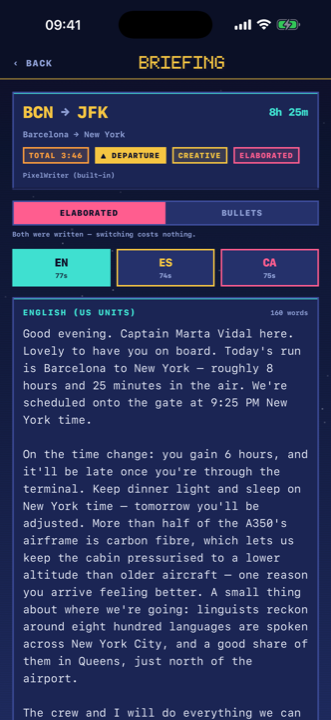
Not the seat pitch, not the meal. The two minutes when someone tells them what is happening and sounds like they mean it. Airline PA guidance says the same thing over and over: a named voice, bad news first, plain words, and something worth knowing.
The hard part is not knowing that. It is doing it at six in the morning, in three languages, before push-back — and not saying the same thing you said last Tuesday.
What it does
From flight plan to handset
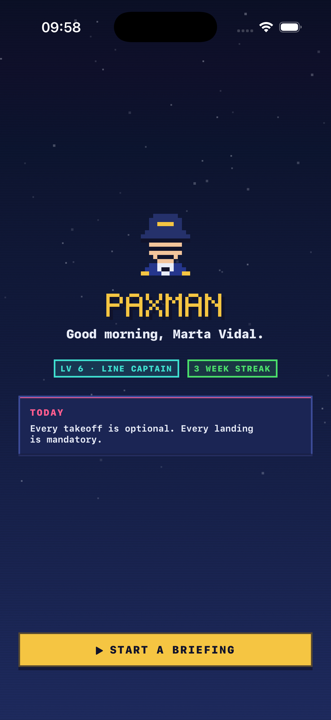
It reads your flight plan
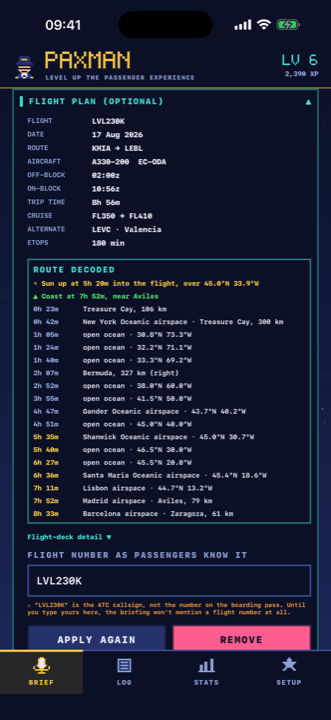
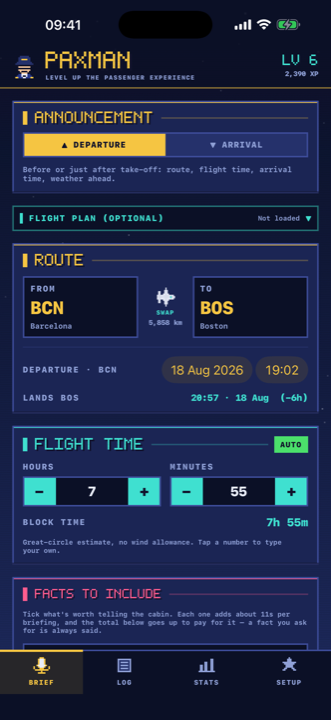
Paste the filed ATC flight plan, or load the whole OFP as a PDF. PAxMan fills in the flight number, aircraft and registration, block times, fuel, passengers and cruise levels — then decodes the route itself.
- Where you are at each point, and which airspace you are entering
- What is nearby, how far, and which side of the aircraft it falls on
- Sunrise en route, worked out to the minute
- The point where you come off the ocean and cross the coast
- Read on the phone. Never uploaded, never kept
Set your recipe once
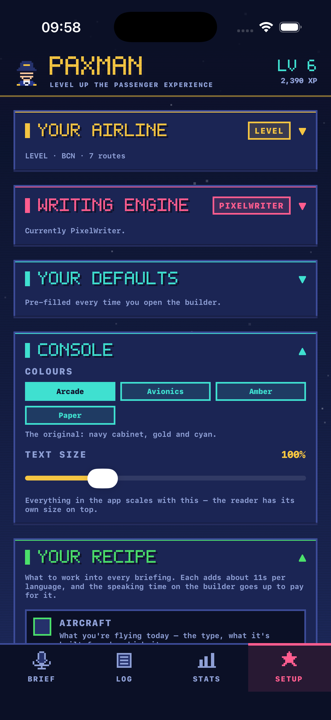
What goes into every briefing lives in Setup, not in the form you fill in before each flight: which subjects are worth a line, in what order the beats run, and how much rope an AI engine gets on each. Then the builder is four taps.
- Build the running order from tokens — welcome, duration, weather, route, curiosities
- Aircraft facts from a checked set; geography computed from your own route
- A cap of six numbers in the whole announcement, and the rest in words
- No flight levels, no ETOPS, no abeam — "about 41,000 feet", not "FL410"
- Four console themes and a type-size slider, including green-on-black avionics
Share the OFP straight to it
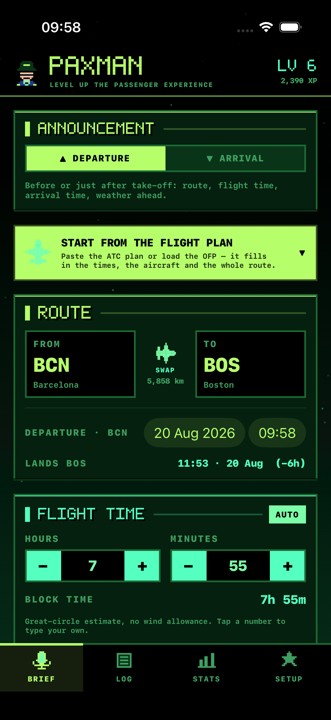
The flight plan arrives by mail or on a messaging app like everything else. Share it to PAxMan and the app opens with the plan already loaded — no saving, no file picker, no hunting through Files at the gate.
- Works with the operator's OFP as a PDF and with the filed ATC plan as text
- Read on the phone, and the copy iOS leaves behind is deleted once it is read
- Says what it loaded, and says why when a file will not parse
Read it, don't memorise it
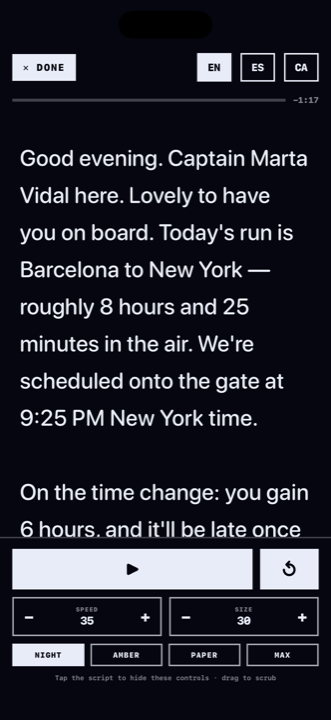
A full-screen teleprompter that scrolls itself, built for the moment you pick up the handset. Speed, type size and colours all adjust in place, and you can switch language mid-briefing.
- Night, amber, paper and maximum-contrast themes, on top of the app's own
- Screen stays awake until you are done
- Prose and bullets both written, switch instantly between them
- Share a briefing to WhatsApp or Messages — one language or all three
Delays handled honestly
Set the minutes and the reason and PAxMan says it plainly in all three languages — early in the announcement, before the weather and before anything pleasant. A delay mentioned late sounds like it was being avoided, and that is the part passengers resent.
- Words that make a cabin sit up are flagged as you type, with the calmer version
- Better information than the forecast? Type in the ATIS and it replaces it
- An NPS check scores what is missing before you generate, says what each one buys, and takes you to the field when you tap it
- Public holidays at the destination — national and the region's own, so the Diada counts in Barcelona and not in Madrid — with what actually closes there
- Jet-lag advice when the shift is worth mentioning, in the direction they are flying
And it keeps score
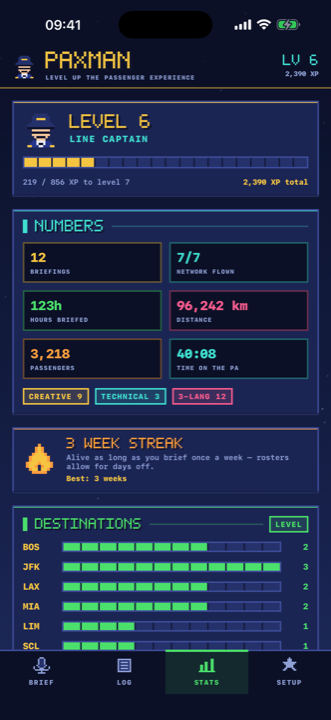
Mark a briefing delivered and it lands in the log, grouped by destination and by date. XP, ranks from Cadet to Legend of the Skies, and nineteen badges.
- Streaks counted in weeks, not days — nobody flies every day
- Hours briefed, distance covered, passengers spoken to
- Filter the log by date, origin or destination
How it works
Three taps, or one paste
Give it the flight
Share the OFP to PAxMan from wherever it arrived, paste the filed ATC plan, or just pick the two airports — block time is estimated the moment you do.
Choose the voice
Creative or technical, prose or bullets, which languages, how long you want to speak for, and which facts are worth including today.
Read it out
Full-screen, hands free, at your pace. Not quite right? Write it again and the wording, the fact and the opening all change.
One thing that never reaches the cabin
The medical diversion aid
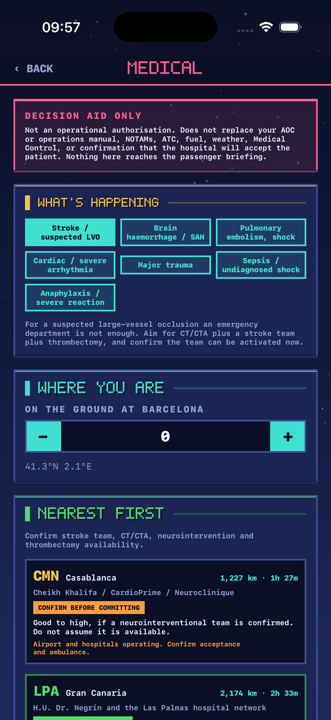
Sixteen airports along the routes captains actually fly, with what each one's hospital network can genuinely do. Pick the emergency, say where you are, and it ranks them nearest first — with the SATCOM script for the call.
- Seven scenarios, from suspected large-vessel stroke to anaphylaxis
- What each field needs: not just an emergency department, but CT, a stroke team, thrombectomy, a cath lab
- A decision aid, never an authorisation — it says so on the screen
- Completely separate from the briefing. Nothing here can reach a passenger
Where the words come from
Two engines, and how much rope you give them
PixelWriter — built in
Writes on the device. No account, no API key, no network beyond a public weather lookup. Works at the gate with one bar of signal, which is when you need it.
Your own AI model — optional
Bring a key for Gemini, OpenAI, Anthropic, Groq, Mistral, OpenRouter or any OpenAI-compatible endpoint. Keys live in the iOS Keychain. If a call fails, PAxMan writes the briefing itself — you are never left without one before a departure.
Open brief, or guided
Guided hands the model a structure and the sentences to use. Open hands it the flight and gets out of the way — no dictated opening, no dictated close, so two briefings for the same route do not read the same. Or copy the whole prompt and run it in your own chat.
Privacy
Nothing leaves the phone that doesn't have to
No account
Open it and use it. There is nothing to sign up for and no profile anywhere.
No tracking
No analytics SDK, no advertising identifier, no third-party scripts. The developer receives nothing.
Two requests
A public weather forecast, and your chosen AI provider if you configured one. That is the whole list.
Who made this
One person, one app
PAxMan is an indie app, built and maintained by Pat at soypat.es — not by an airline, an aircraft manufacturer or a software company. There is no team, no investors and no roadmap committee.
That is why it works the way it does. There is nothing to monetise, so there is no account to create, no analytics to feed and no reason for anything to leave your phone that does not have to. And when something in it is wrong, the person who can fix it is the person who wrote it.
Get in touch at soypat.es — bug reports and corrections from working crew are the fastest way this gets better.
Questions
FAQ
Does it need an internet connection?
Only for the destination weather, and it degrades gracefully without it. The built-in writer composes every briefing on the device.
Which languages does it write, and are they translations?
English with US units, Spain's Spanish and Catalan with metric. Each one is written natively — none is a translation of another, so none of them reads like one.
Can it really read a flight plan?
Yes. Either the filed ICAO flight plan pasted as text, or the full OFP as a PDF. Both are parsed on the phone using the document's own text layer. The document is never uploaded and never stored — only the fields shown to you.
Will it make things up?
Operational facts, no: times, weather, distances and everything from the flight plan come from real data. City and aircraft facts come from a checked set, and if you hand a subject over to an AI model the app tells you plainly that it can no longer verify that part.
Is this an operational tool?
No, and it says so in the app. It drafts spoken announcements. Its weather is a public forecast, not a METAR or TAF, and must never be used for an operational decision.
Can I send the flight plan straight from Mail or WhatsApp?
Yes. PAxMan appears in the iOS share sheet for PDFs and text files. Share the OFP to it and the app opens with the plan already loaded. The file is read on the phone, and the copy iOS hands over is deleted once it has been read.
Does it know about public holidays at the destination?
Yes, and the regional ones too. It checks the day they land and the day after, against the destination airport's own region — so the Diada counts in Barcelona and not in Madrid. It also says what actually closes, which is not the same everywhere: most shops in continental Europe, but only banks and public offices in the United States.
Can I change how it looks?
Four console themes — the arcade original, avionics green on black, amber, and paper for a sunlit flight deck — and a type-size slider that scales the whole app. The reader has its own themes on top.
Which iPhones does it run on?
Any iPhone on iOS 17 or later. Portrait, iPhone only.
Who is behind it?
One person. PAxMan is an indie app from soypat.es, not from an airline or a manufacturer, and it is not affiliated with any. That also means there is nobody to sell your data to.
What does it cost?
Nothing. If you choose to use your own AI model, that provider bills you directly and PAxMan takes no part in it.
Level up the passenger experience
Three languages. Under three minutes. Before push-back.
Free · iOS 17+ · no account